Close Menu
PSD VaultPSD Vault
  • VIP Area
  • Photoshop Basics
  • Photo Effect
  • Text Effect
  • Premium Tuts
  • Resources
  • Drawing
  • Inspiration
  • Web Graphics
  • Abstract
  • Freebies
  • Advertise
  • Get in Touch
  • About PSD Vault
Facebook Instagram Pinterest YouTube TikTok
Facebook Instagram Pinterest YouTube TikTok RSS
PSD VaultPSD Vault
  • VIP Area
    • Sign Up
    • Log In
  • Free Image Tools
  • Photoshop Basics
  • AI
  • Photoshop Error Fixes
  • Video Tutorial
  • Photo Effect
  • Text Effect
  • Premium Tuts
  • Drawing
PSD VaultPSD Vault
Home»Drawing»VIP Exclusive Tutorial – Design Wedding Menu using Photoshop, InDesign, and Illustrator
Drawing

VIP Exclusive Tutorial – Design Wedding Menu using Photoshop, InDesign, and Illustrator

By Mohammad JeprieApril 19, 20191 Min Read
Share
Facebook Twitter LinkedIn Pinterest Email

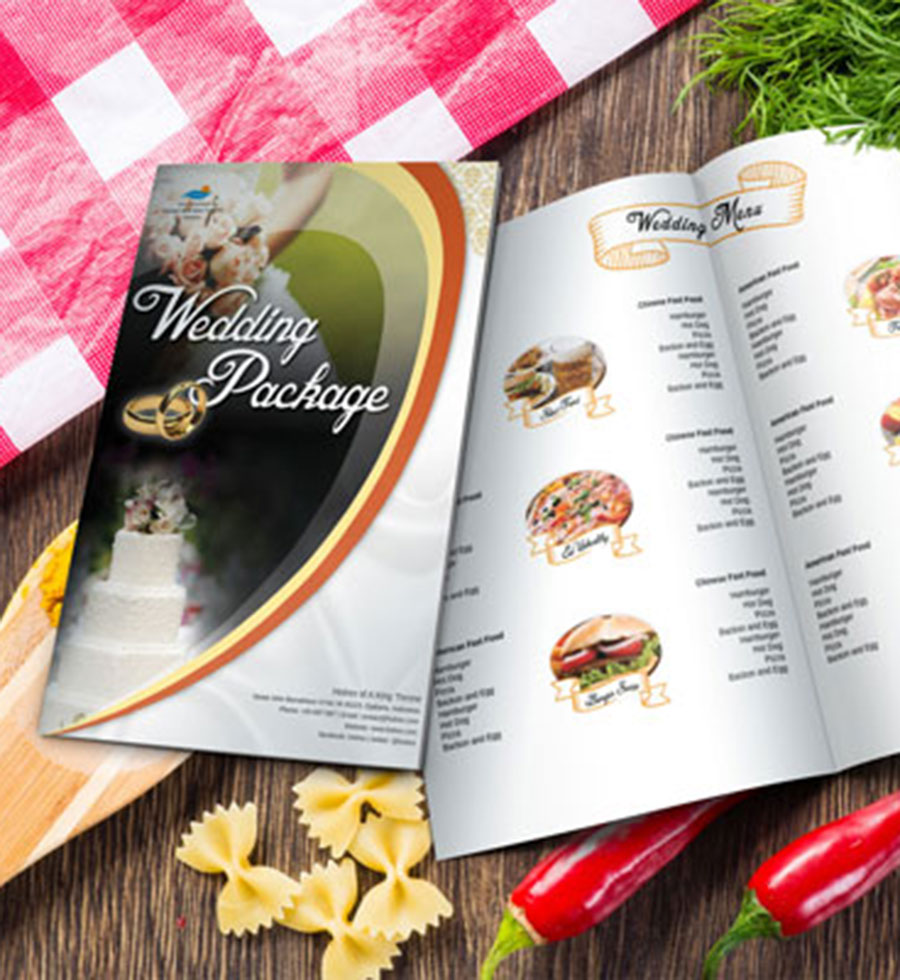
Welcome to another VIP Members Exclusive Photoshop tutorial written specifically for the PSD Vault VIP Members! In this tutorial, you will learn the process of creating an attractive Wedding Menu using Photoshop, InDesign, and Illustrator.

This tutorial is written exclusively for PSD Vault by Mohammad Jeprie, who is an excellent icon designer from Indonesia.

Final Image Preview

This is the image you will be creating: (click to enlarge)

What You Will Learn

This Photoshop tutorial will cover:

  1. How to design a wedding menu using combination of Photoshop, InDesign, and Illustrator
  2. How to effectively design a paper background in Photoshop, preparing vector pattern in Illustrator, use master page in InDesign

🚀 Ready to Elevate Your Photoshop Skills? Unlock VIP Access Now!

Don’t miss out on this exclusive opportunity to refine your digital artistry skills. Sign up for PSD Vault VIP membership today and open the doors to a world of creativity, inspiration, and artistic mastery.

🔓 Unlock VIP Access Now

illustrator indesign menu photoshop wedding
Share. Facebook Twitter Pinterest LinkedIn Tumblr Email
Mohammad Jeprie
  • Website

Mohammad Jeprie is a blogger, author, and graphic designer from Indonesia. He's not an artist, but he knows a few Photoshop techniques and loves to share it with everyone.

Related Posts

How to Make a GIF in Photoshop: 3 Complete Methods (2026 Guide)

April 26, 2026

How to Read Photoshop Histograms for Beginners

April 18, 2026

How to Sharpen Images in Photoshop: 4 Methods for Every Situation

April 12, 2026

Comments are closed.

Don't Miss

How to Make a GIF in Photoshop: 3 Complete Methods (2026 Guide)

April 26, 2026

How to Draw Water Ripples Effect in Photoshop

April 19, 2026

How to Read Photoshop Histograms for Beginners

April 18, 2026

For Beginners

Basics

How to Read Photoshop Histograms for Beginners

By James QuApril 18, 20267 Mins Read

How to Sharpen Images in Photoshop: 4 Methods for Every Situation

April 12, 2026

Curves or Levels: Choosing the Right Tool for Stunning Edits

March 26, 2026

10 Proven Ways to Improve Photoshop Performance in 2026

March 22, 2026

You May Also Like

Drawing

How to Make a GIF in Photoshop: 3 Complete Methods (2026 Guide)

By Mohammad JeprieApril 26, 202625 Mins Read
Basics

How to Read Photoshop Histograms for Beginners

By James QuApril 18, 20267 Mins Read
Basics

How to Sharpen Images in Photoshop: 4 Methods for Every Situation

By James QuApril 12, 202618 Mins Read
Facebook X (Twitter) Instagram Pinterest
  • About Us
  • Get in Touch
  • Advertise
  • VIP Area
  • Free Image Tools
  • Privacy Policy
  • Terms & Conditions
© 2026 PSD Vault. All Right Reserved.

Type above and press Enter to search. Press Esc to cancel.

Manage Consent
To provide the best experiences, we use technologies like cookies to store and/or access device information. Consenting to these technologies will allow us to process data such as browsing behavior or unique IDs on this site. Not consenting or withdrawing consent, may adversely affect certain features and functions.
Functional Always active
The technical storage or access is strictly necessary for the legitimate purpose of enabling the use of a specific service explicitly requested by the subscriber or user, or for the sole purpose of carrying out the transmission of a communication over an electronic communications network.
Preferences
The technical storage or access is necessary for the legitimate purpose of storing preferences that are not requested by the subscriber or user.
Statistics
The technical storage or access that is used exclusively for statistical purposes. The technical storage or access that is used exclusively for anonymous statistical purposes. Without a subpoena, voluntary compliance on the part of your Internet Service Provider, or additional records from a third party, information stored or retrieved for this purpose alone cannot usually be used to identify you.
Marketing
The technical storage or access is required to create user profiles to send advertising, or to track the user on a website or across several websites for similar marketing purposes.
  • Manage options
  • Manage services
  • Manage {vendor_count} vendors
  • Read more about these purposes
View preferences
  • {title}
  • {title}
  • {title}