Close Menu
PSD VaultPSD Vault
  • VIP Area
  • Photoshop Basics
  • Photo Effect
  • Text Effect
  • Premium Tuts
  • Resources
  • Drawing
  • Inspiration
  • Web Graphics
  • Abstract
  • Freebies
  • Advertise
  • Get in Touch
  • About PSD Vault
Facebook Instagram Pinterest YouTube TikTok
Facebook Instagram Pinterest YouTube TikTok RSS
PSD VaultPSD Vault
  • VIP Area
    • Sign Up
    • Log In
  • Photoshop Basics
  • AI
  • Photoshop Error Fixes
  • Video Tutorial
  • Photo Effect
  • Text Effect
  • Premium Tuts
  • Drawing
  • Opinion
PSD VaultPSD Vault
Home»Photo Effect»VIP Exclusive Tutorial – Create Magical Landscape in Photoshop
Photo Effect

VIP Exclusive Tutorial – Create Magical Landscape in Photoshop

By Maria SemelevichJanuary 14, 20212 Mins Read
Share
Facebook Twitter LinkedIn Pinterest Email

This tutorial is available via the PSD Vault VIP members area.

Welcome to another Exclusive Photoshop tutorial written specifically for the PSD Vault VIP Members! In this Photoshop tutorial, we will create a breathtaking magical landscape of the eastern highlands. Download tutorial now at PSD Vault VIP area.

This tutorial shows how to develop morning and evening version of the same image out of a plain background, using photo manipulation techniques and advanced tricks.

This tutorial is written exclusively for PSD Vault by digital artist Maria Semelevich.

If your membership is active, simply log in and download the tutorial now at the VIP members area.

Final Image Preview

This is the image you will be creating: (click to enlarge)

Sunrise Version

Final_Image

Sunset Version

Final_Image_2

What You Will Learn

This Photoshop tutorial will cover the following main topics:

  1. Construction landscape and basic color correction
  2. Light, Sky, Cloud Creation
  3. Create Depth of Field

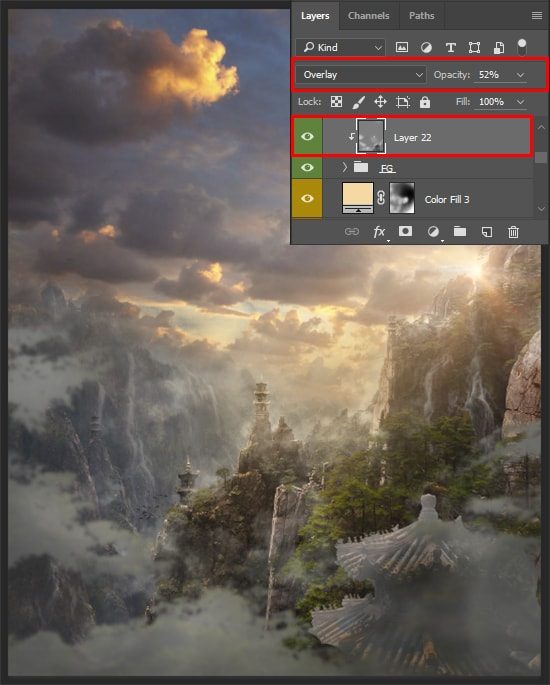
Sample Screenshots

Step_3
Step_21
Step_27_2

🚀 Ready to Elevate Your Photoshop Skills? Unlock VIP Access Now!

Don’t miss out on this exclusive opportunity to refine your digital artistry skills. Sign up for PSD Vault VIP membership today and open the doors to a world of creativity, inspiration, and artistic mastery.

🔓 Unlock VIP Access Now

landscape magical premium vip
Share. Facebook Twitter Pinterest LinkedIn Tumblr Email
Maria Semelevich
  • Website

Maria is a Digital Artist, Illustrator, and Photographer. She loves working in the style of photo manipulation, digital effects and 3D.

Related Posts

VIP Exclusive Photoshop Tutorial – “The Real Her”

February 7, 2026

How to Create a Fairytale Composition in Photoshop

February 6, 2026

How to Use AI-Driven Landscape Masking in Adobe Photoshop’s Camera Raw

January 31, 2026

2 Comments

  1. Abdullah Allamin on December 14, 2016 9:22 PM

    Excellent work but I am not satisfied with tutorial. Because I don’t understand properly from where and how you manipulate the trample top of the hill.

  2. Takri on January 27, 2017 9:41 PM

    This is one of the helpful post.I like your blog simplicity.This is one of the developed and nice post.Good information.

Don't Miss

How to Stay Ahead of Every Photoshop Update & Unlock Their Full Power

February 8, 2026

VIP Exclusive Photoshop Tutorial – “The Real Her”

February 7, 2026

How to Create a Fairytale Composition in Photoshop

February 6, 2026

For Beginners

Basics

How to Stay Ahead of Every Photoshop Update & Unlock Their Full Power

By Valentin PetroffFebruary 8, 20265 Mins Read

Dodge & Burn Tool in Photoshop – The Beginner’s Guide

January 24, 2026

How to Pixelate an Image in Photoshop

January 21, 2026

How to Resize Images Without Losing Quality in Photoshop

January 8, 2026

You May Also Like

Photo Effect

VIP Exclusive Photoshop Tutorial – “The Real Her”

By Bram VanhaerenFebruary 7, 20261 Min Read
Photo Effect

How to Create a Fairytale Composition in Photoshop

By Maria SemelevichFebruary 6, 202619 Mins Read
AI

How to Use AI-Driven Landscape Masking in Adobe Photoshop’s Camera Raw

By James QuJanuary 31, 20265 Mins Read
Facebook X (Twitter) Instagram Pinterest
  • About Us
  • Get in Touch
  • Advertise
  • VIP Area
  • Privacy Policy
  • Terms & Conditions
© 2026 PSD Vault. All Right Reserved.

Type above and press Enter to search. Press Esc to cancel.

Manage Consent
To provide the best experiences, we use technologies like cookies to store and/or access device information. Consenting to these technologies will allow us to process data such as browsing behavior or unique IDs on this site. Not consenting or withdrawing consent, may adversely affect certain features and functions.
Functional Always active
The technical storage or access is strictly necessary for the legitimate purpose of enabling the use of a specific service explicitly requested by the subscriber or user, or for the sole purpose of carrying out the transmission of a communication over an electronic communications network.
Preferences
The technical storage or access is necessary for the legitimate purpose of storing preferences that are not requested by the subscriber or user.
Statistics
The technical storage or access that is used exclusively for statistical purposes. The technical storage or access that is used exclusively for anonymous statistical purposes. Without a subpoena, voluntary compliance on the part of your Internet Service Provider, or additional records from a third party, information stored or retrieved for this purpose alone cannot usually be used to identify you.
Marketing
The technical storage or access is required to create user profiles to send advertising, or to track the user on a website or across several websites for similar marketing purposes.
  • Manage options
  • Manage services
  • Manage {vendor_count} vendors
  • Read more about these purposes
View preferences
  • {title}
  • {title}
  • {title}